
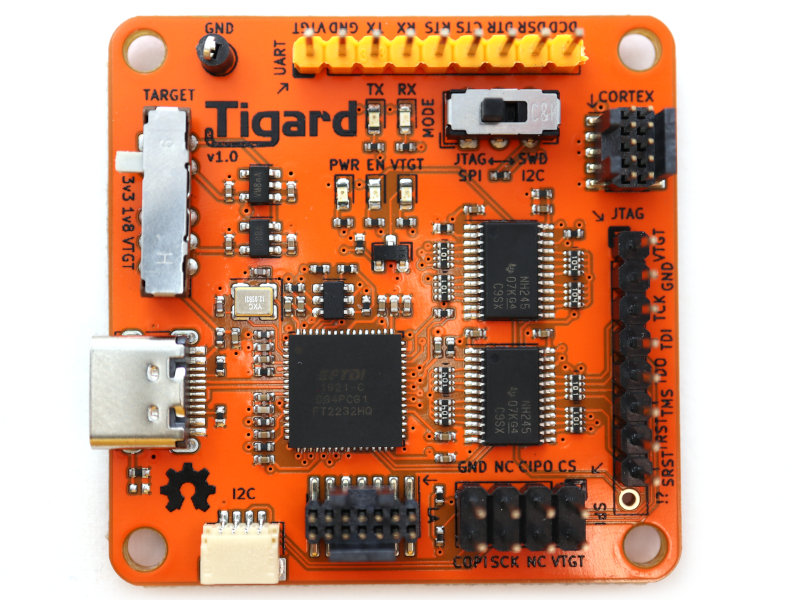
Tigard by SecuringHardware.com
Tigard is an FTDI FT2232H-based multi-protocol tool for hardware hacking. It’s designed to be easy to use, with individually labelled wire harnesses and built-in level shifting.
Highlights:
- Dual-port, with one dedicated to UART and the second shared with other interfaces
- High-performance directional level shifters for 1.8 to 5.5v operation
- Switch to choose between on-board 1.8, 3.3, and 5.0v supplies and vTarget
- Switch to choose between SPI/JTAG and I2C/SWD modes
- Logic analyser port to observe device-level signals
- Indicator lights to aid debugging
Learn More
Adafruit’s Blinka-on-FT232H guide covers most of what you’ll need to use it with Tigard, but keep in mind:
- Tigard uses the FT2232H with two separate interfaces, so you’ll need to:
export BLINKA_FT2232H=1 - Tigard has unidirectional level shifters - only certain pins can be in or out
- UART header is connected to the first interface on the AC# and AD# pins
- I2C, SPI, and JTAG headers use the second interface on the BC#, BD#, and SDA1, SCL1, SCLK1, etc pins.
- Documentation
Purchase
Contribute
Have some info to add for this board? Edit the source for this page here.
Adafruit Blinka Installation
We use a special library called adafruit_blinka (named after Blinka, the CircuitPython mascot) to provide the layer that translates the CircuitPython hardware API to whatever library the Linux board provides.
For example, on Raspberry Pi we use the python RPi.GPIO library. For any I2C interfacing we'll use ioctl messages to the /dev/i2c device. For SPI we'll use the spidev python library, etc. These details don't matter so much because they all happen underneath the adafruit_blinka layer.
Board Usage Options: Attached Device