
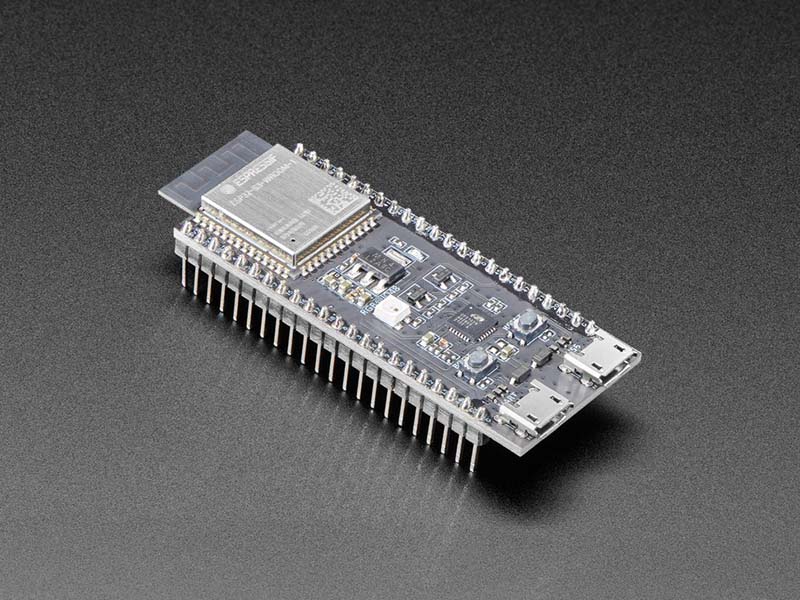
ESP32-S3-DevKitC-1-N32R16 by Espressif
The ESP32-S3-DevKitC-1 is an entry-level development board equipped with ESP32-S3-WROOM-2, a general-purpose Wi-Fi + Bluetooth LE MCU module that integrates complete Wi-Fi and Bluetooth LE functions. This version is equipped with the ESP32-S3-WROOM-2 (PCB antenna) with 32MB Flash and 16MB PSRAM.
Most of the I/O pins on the module are broken out to the pin headers on both sides of this board for easy interfacing. Developers can either connect peripherals with jumper wires or mount ESP32-S3-DevKitC-1 on a breadboard. We particularly like that there’s a debug UART/USB port and a separate native USB port, so you can upload/debug/USB all at once.
At the core of the module is an ESP32-S3R16V, an Xtensa® 32-bit LX7 CPU that operates at up to 240 MHz. You can power off the CPU and make use of the low-power co-processor to constantly monitor the peripherals for changes or crossing of thresholds. ESP32-S3 integrates a rich set of peripherals including SPI, LCD, Camera interface, UART, I2C, I2S, remote control, pulse counter, LED PWM, USB Serial/JTAG controller, MCPWM, SDIO host, GDMA, TWAI® controller (compatible with ISO 11898-1), ADC, touch sensor, temperature sensor, timers, and watchdogs, as well as up to 45 GPIOs. It also includes a full-speed USB 1.1 On-The-Go (OTG) interface to enable USB communication
There are three mutually exclusive ways to provide power to the board:
- USB-to-UART Port and ESP32-S3 USB Port (either one or both), default power supply (recommended)
- 5V and G (GND) pins
- 3v3 and G (GND) pins
Components:
- ESP32-S3-WROOM-2: ESP32-S3-WROOM-2 is a powerful, generic Wi-Fi + Bluetooth LE MCU module that has a rich set of peripherals. It provides acceleration for neural network computing and signal processing workloads. ESP32-S3-WROOM-2 comes with a PCB antenna.
- 5V to 3.3V LDO: Power regulator that converts a 5V supply into a 3.3V output.
- Pin Headers: All available GPIO pins (except for the SPI bus for flash and PSRAM) are broken out to the pin headers on the board for easy interfacing and programming. For details, please see Header Block. Note that GPIO35, GPIO36 and GPIO37 are used internally for the octal SPI flash and PSRAM and are not available for external use.
- USB-to-UART Port: A Micro-USB port used for power supply to the board, for flashing applications to the chip, as well as for communication with the chip via the on-board USB-to-UART bridge.
- Native ESP32-S3 USB Port: ESP32-S3 full-speed USB OTG interface, compliant with the USB 1.1 specification. The interface is used for power supply to the board, for flashing applications to the chip, for communication with the chip using USB 1.1 protocols, as well as for JTAG debugging.
- Boot Button: Download button. Holding down Boot and then pressing Reset initiates Firmware Download mode for downloading firmware through the serial port.
- Reset Button
- USB-to-UART Bridge: Single USB-to-UART bridge chip provides transfer rates up to 3 Mbps.
- RGB LED: Addressable RGB LED, driven by GPIO38. This board is a v1.1 revision of the ESP32-S3-DevKitC-1; the initial v1.0 revision drove the RGB LED from GPIO48 instead.
- 3.3V Power On LED: Turns on when the USB power is connected to the board.
Purchase
Contribute
Have some info to add for this board? Edit the source for this page here.
CircuitPython 10.3.1
This is the latest stable release of CircuitPython that will work with the ESP32-S3-DevKitC-1-N32R16. Use this release if you are new to CircuitPython.
Modules included in this download
_asyncio _bleio _bleio (native) _eve _pixelmap adafruit_bus_device adafruit_pixelbuf aesio alarm analogbufio analogio array atexit audiobusio audiocore audioi2sin audiomixer audiomp3 binascii bitbangio bitmapfilter bitmaptools board builtins builtins.pow3 busdisplay busio busio.SPI busio.UART canio codeop collections countio digitalio displayio dualbank epaperdisplay errno espcamera espidf espnow espulp fontio fourwire framebufferio frequencyio getpass gifio hashlib i2cdisplaybus io ipaddress jpegio json keypad keypad.KeyMatrix keypad.Keys keypad.ShiftRegisterKeys keypad_demux keypad_demux.DemuxKeyMatrix locale lvfontio math max3421e mdns memorymap microcontroller msgpack neopixel_write nvm onewireio os os.getenv paralleldisplaybus ps2io pulseio pwmio qrio rainbowio random re rgbmatrix rotaryio rtc sdcardio sdioio select sharpdisplay socketpool socketpool.socketpool.AF_INET6 ssl storage struct supervisor supervisor.get_setting synthio sys terminalio tilepalettemapper time touchio traceback ulab usb usb_audio usb_cdc usb_hid usb_midi vectorio warnings watchdog wifi zlibFeatures: Wi-Fi, Bluetooth/BTLE, Breadboard-Friendly
CircuitPython 11.0.0-alpha.2
This is the latest development release of CircuitPython that will work with the ESP32-S3-DevKitC-1-N32R16.
WARNING: On Espressif ESP32-S2 and ESP32-S3 boards with 4MB flash, CircuitPython 10.0.0-beta.0 and later require TinyUF2 bootloader version 0.33.0 or later. Older TinyUF2 bootloaders don't provide enough room for the firmware and cannot load it. See the Release Notes for more details, and see Update UF2 Bootloader below.
Alpha development releases are early releases. They are unfinished, are likely to have bugs, and the features they provide may change. Beta releases may have some bugs and unfinished features, but should be suitable for many uses. A Release Candidate (rc) release is considered done and will become the next stable release, assuming no further issues are found.
Please try alpha, beta, and rc releases if you are able. Your testing is invaluable: it helps us uncover and find issues quickly.
Release Notes for 11.0.0-alpha.2
Modules included in this download
_asyncio _bleio _bleio (native) _eve _pixelmap adafruit_bus_device adafruit_pixelbuf aesio alarm analogbufio analogio array atexit audiobusio audiocore audioi2sin audiomixer audiomp3 binascii bitbangio bitmapfilter bitmaptools board builtins builtins.pow3 busdisplay busio busio.SPI busio.UART canio codeop collections countio digitalio displayio dualbank epaperdisplay errno espcamera espidf espnow espulp fontio fourwire framebufferio frequencyio getpass gifio hardwarekey hashlib hmac i2cdisplaybus io ipaddress jpegio json keypad keypad.KeyMatrix keypad.Keys keypad.ShiftRegisterKeys keypad_demux keypad_demux.DemuxKeyMatrix locale lvfontio math max3421e mdns memorymap microcontroller msgpack neopixel_write nvm onewireio os os.getenv paralleldisplaybus ps2io pulseio pwmio qrio rainbowio random re rgbmatrix rotaryio rtc sdcardio sdioio select sharpdisplay socketpool socketpool.socketpool.AF_INET6 ssl storage struct supervisor supervisor.get_setting synthio sys terminalio tilepalettemapper time touchio traceback ulab usb usb_audio usb_cdc usb_hid usb_midi vectorio warnings watchdog wifi zlibFeatures: Wi-Fi, Bluetooth/BTLE, Breadboard-Friendly
Absolute Newest
Every time we commit new code to CircuitPython we automatically build binaries for each board and language. The binaries are stored on Amazon S3, organized by board, and then by language. These releases are even newer than the development release listed above. Try them if you want the absolute latest and are feeling daring or want to see if a problem has been fixed.
Previous Versions of CircuitPython
All previous releases of CircuitPython are available for download from Amazon S3 through the button below. For very old releases, look in the OLD/ folder for each board. Release notes for each release are available at GitHub button below.
Older releases are useful for testing if you something appears to be broken in a newer release but used to work, or if you have older code that depends on features only available in an older release. Otherwise we recommend using the latest stable release.
Install, Repair, or Update UF2 Bootloader
Latest version: 0.35.0
The UF2 bootloader allows you to load CircuitPython, MakeCode, and Arduino programs. The bootloader itself is not CircuitPython. On Espressif boards, the UF2 bootloader is called TinyUF2. If the TinyUF2 bootloader is installed, you can check its version by looking in the INFO_UF2.TXT file when the BOOT drive is visible (FTHRS2BOOT, MAGTAGBOOT, HOUSEBOOT, etc.)
In general, it is not necessary to update TinyUF2 at every version change. You can read the release notes on GitHub to see what has been changed. Update if you've been told about a necessary change or a bug fix.
Note: CircuitPython 10 and later, on Espressif boards with 4MB flash, requires TinyUF2 0.33.0 or later. The flash partition layout has changed (details).
If TinyUF2 has never been installed on the board, or it was removed by erasing or overwriting the flash, it must be installed in order to flash .uf2 files onto the board. But you don't need the TinyUF2 bootloader to upload .bin files. They can be uploaded using the built-in ROM bootloader, with the Adafruit WebSerial ESPTool or esptool.py.
Warning: Installing the TinyUF2 bootloader will erase everything that was previously on the board. Save any files in CIRCUITPY for which you don't have backups.
There are several ways to install the TinyUF2 bootloader on your board. Check to see if your board's manufacturer provides specific instructions. For Adafruit boards, consult the Factory Reset page in the Learn Guide for your particular board (example).
The easiest way to install TinyUF2 is to use the OPEN INSTALLER button (see above, in the CiruitPython sections). You can also use the Adafruit WebSerial ESPTool, or esptool.py, as described in the Factory Reset page.
- Plug board into a USB port on your computer using a data/sync cable. Make sure it is the only board plugged in, and that a charge-only cable is not being used.
- Press and hold the BOOT button (sometimes marked "B0").
- Press and release the RESET button (sometimes marked "RST").
- Release the BOOT button. This starts the ROM bootloader.
After installing TinyUF2, enter the UF2 bootloader by double-clicking the RESET button. On boards with an RGB status LED, you usually tap reset once, wait for the LED to turn purple, and tap again before the purple goes away. On other boards, consult the board documentation.
If you are updating TinyUF2, look at INFO_UF2.TXT to verify the new version of TinyUF2, by checking the version number. Then you will need to copy the CircuitPython.uf2 file to the BOOT drive.