
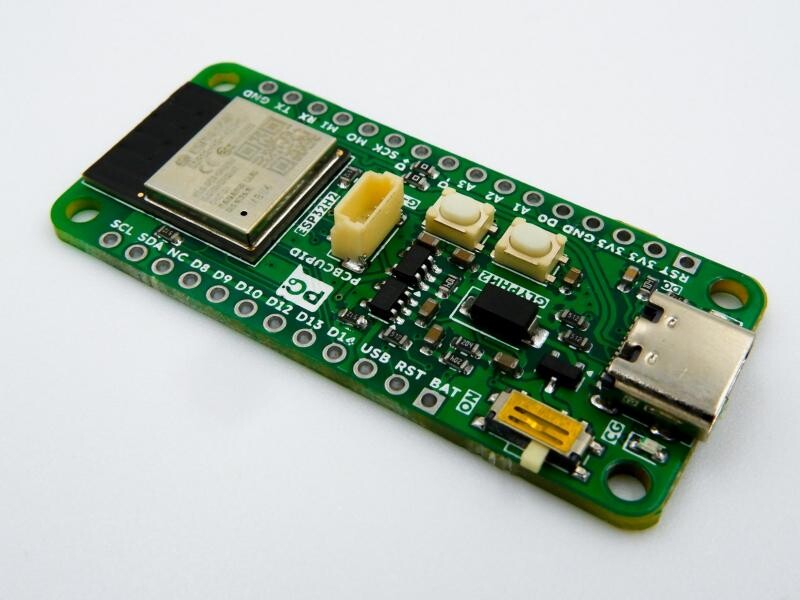
Pcbcupid GLYPH H2 by Pcbcupid
The Pcbcupid GLYPH H2 is a compact development board based on the ESP32-H2-MINI-1-N4 module, purpose-built for BLE, Zigbee, and Thread mesh networking applications. Unlike the C3/C6, the H2 has no Wi-Fi radio — it’s optimized specifically for low-power 802.15.4 mesh and BLE connectivity, making it ideal for smart home nodes, sensor mesh networks, and Matter-compatible devices.
The board features an onboard GLINK connector — QWIIC/STEMMA QT compatible — for solder-free sensor and module integration. It includes auto power switching between USB and battery, battery voltage sensing, and a slide switch to cut battery power entirely.
The GLYPH H2 uses a built-in USB bootloader. Hold BOOT while plugging in USB to enter bootloader mode — it appears as a COM port for flashing.
For peripherals, the ESP32-H2 exposes I2C, SPI, and UART via the GPIO matrix. The chip includes a Zero-Cross Detection (ZCD) peripheral on GPIO10/GPIO11, useful for AC dimming and power control applications.
Board specifications
- ESP32-H2-MINI-1-N4 module
- Single-core 32-bit RISC-V processor, 3.3V logic
- 4MB SPI flash
- Bluetooth 5 (LE)
- 802.15.4 radio for Zigbee and Thread
- No Wi-Fi
- USB-C for power, programming, and serial debugging
- Built-in LiPo/Li-ion charger with charging status LED
- Auto power switching between USB and battery
- Onboard slide switch to cut battery power
- Battery voltage sensing
- LiPo solder pads on rear of board
- 3.3V regulator
- I2C: SCL=GPIO5, SDA=GPIO4
- SPI: SCK=GPIO11, MOSI=GPIO2(FSPIWP)/GPIO1(FSPICS0), MISO=GPIO0(FSPIQ)
- UART0: TX=GPIO24, RX=GPIO23
- Zero-Cross Detection: ZCD0=GPIO10, ZCD1=GPIO11
- GLINK connector (QWIIC/STEMMA QT compatible)
- BOOT and RESET buttons onboard
Learn More
Purchase
Contribute
Have some info to add for this board? Edit the source for this page here.
CircuitPython 10.3.1
This is the latest stable release of CircuitPython that will work with the Pcbcupid GLYPH H2. Use this release if you are new to CircuitPython.
Modules included in this download
_asyncio _bleio _bleio (native) _eve _pixelmap adafruit_bus_device adafruit_pixelbuf aesio alarm analogbufio analogio array atexit audiobusio audiocore audioi2sin audiomixer audiomp3 binascii bitbangio bitmapfilter bitmaptools board builtins builtins.pow3 busdisplay busio busio.SPI busio.UART canio codeop collections countio digitalio displayio epaperdisplay errno espidf fontio fourwire framebufferio frequencyio getpass gifio hashlib i2cdisplaybus io jpegio json keypad keypad.KeyMatrix keypad.Keys keypad.ShiftRegisterKeys keypad_demux keypad_demux.DemuxKeyMatrix locale lvfontio math microcontroller msgpack neopixel_write nvm onewireio os os.getenv ps2io pulseio pwmio rainbowio random re rotaryio rtc sdcardio select sharpdisplay socketpool.socketpool.AF_INET6 storage struct supervisor supervisor.get_setting synthio sys terminalio tilepalettemapper time touchio traceback ulab vectorio warnings watchdog zlibFeatures: Bluetooth/BTLE, USB-C, Battery Charging, Breadboard-Friendly
CircuitPython 11.0.0-alpha.1
This is the latest development release of CircuitPython that will work with the Pcbcupid GLYPH H2.
Alpha development releases are early releases. They are unfinished, are likely to have bugs, and the features they provide may change. Beta releases may have some bugs and unfinished features, but should be suitable for many uses. A Release Candidate (rc) release is considered done and will become the next stable release, assuming no further issues are found.
Please try alpha, beta, and rc releases if you are able. Your testing is invaluable: it helps us uncover and find issues quickly.
Release Notes for 11.0.0-alpha.1
Modules included in this download
_asyncio _bleio _bleio (native) _eve _pixelmap adafruit_bus_device adafruit_pixelbuf aesio alarm analogbufio analogio array atexit audiobusio audiocore audioi2sin audiomixer audiomp3 binascii bitbangio bitmapfilter bitmaptools board builtins builtins.pow3 busdisplay busio busio.SPI busio.UART canio codeop collections countio digitalio displayio epaperdisplay errno espidf fontio fourwire framebufferio frequencyio getpass gifio hardwarekey hashlib hmac i2cdisplaybus io jpegio json keypad keypad.KeyMatrix keypad.Keys keypad.ShiftRegisterKeys keypad_demux keypad_demux.DemuxKeyMatrix locale lvfontio math microcontroller msgpack neopixel_write nvm onewireio os os.getenv ps2io pulseio pwmio rainbowio random re rotaryio rtc sdcardio select sharpdisplay socketpool.socketpool.AF_INET6 storage struct supervisor supervisor.get_setting synthio sys terminalio tilepalettemapper time touchio traceback ulab vectorio warnings watchdog zlibFeatures: Bluetooth/BTLE, USB-C, Battery Charging, Breadboard-Friendly
Absolute Newest
Every time we commit new code to CircuitPython we automatically build binaries for each board and language. The binaries are stored on Amazon S3, organized by board, and then by language. These releases are even newer than the development release listed above. Try them if you want the absolute latest and are feeling daring or want to see if a problem has been fixed.
Previous Versions of CircuitPython
All previous releases of CircuitPython are available for download from Amazon S3 through the button below. For very old releases, look in the OLD/ folder for each board. Release notes for each release are available at GitHub button below.
Older releases are useful for testing if you something appears to be broken in a newer release but used to work, or if you have older code that depends on features only available in an older release. Otherwise we recommend using the latest stable release.